


Chat With Your Database: Complete 2026 Guide SQL Chat tools

The pitch is intoxicating: ask your database a question in plain English, get an answer back instantly. No SQL required. No waiting on the data team. Just insights, on demand.
The reality? It's a minefield. Tools that look magical in a controlled demo routinely faceplant when they hit your actual database. Vendors slap "AI-powered" onto decade-old architectures. And the security implications of letting an LLM write queries against your production data are genuinely terrifying if you don't handle them right.
I’ve spent time cutting through the noise. Whether you're a developer evaluating frameworks to build a custom solution, or a product leader trying to unlock self-serve analytics for your team, here is what you actually need to know.
TL;DR / Key Takeaways:
- Syntax is cheap: Modern LLMs write perfectly valid SQL. The hard part is getting the right SQL that accounts for your messy, undocumented business logic.
- The demo gap is real: Tools fail in production because they lack "tribal knowledge" (e.g., knowing to exclude test_user_01).
- Build vs. Buy: Open-source frameworks (Vanna, LangChain) give you control but require heavy, ongoing maintenance. AI-native platforms (BlazeSQL) offer the fastest path to actual self-serve BI.
- Security non-negotiable: Never give an AI tool anything more than read-only access to a database replica.
Let's get into it.
Not sure which solution is right for your needs? Take our quick 2-minute assessment to get personalized recommendations.
What "Chat With Your Database" Actually Means
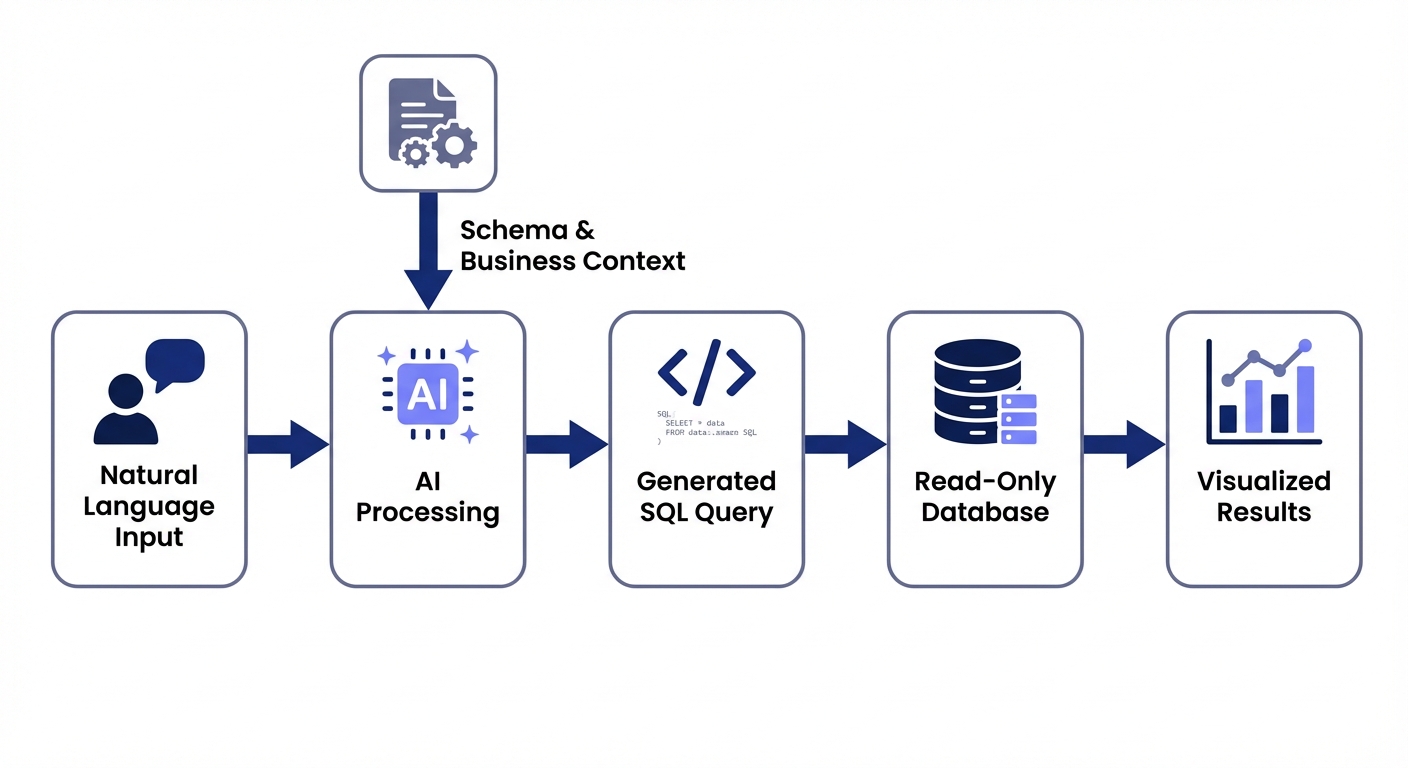
At its core, "chat with your database" uses natural language processing (powered by large language models) to translate plain English into SQL queries, execute them, and return the results.
Instead of writing this:
SELECT product_category, SUM(revenue) as total_revenue
FROM orders
WHERE order_date >= DATE_SUB(CURRENT_DATE, INTERVAL 3 MONTH)
GROUP BY product_category
ORDER BY total_revenue DESC
LIMIT 10;
You just ask: "What are our top 10 product categories by revenue in the last 3 months?"
The underlying technology has matured rapidly. Modern LLMs can generate syntactically correct SQL with impressive accuracy. But here's the trick: syntactically correct SQL is just table stakes. The actual hurdle is generating the query that answers the underlying business question correctly.
Who This Guide Is For
The text-to-SQL landscape has split into a few distinct camps. Your ideal tool depends entirely on which of these buckets you fall into:
- Developers and data engineers: You want to build custom solutions using frameworks like LangChain or Vanna.ai. You need granular control and deep stack integration.
- Data teams: You are drowning in ad-hoc request backlogs. You want to empower business users to self-serve so you can get back to deep work.
- Business users: Product managers, marketers, and ops leaders who need data yesterday but don't know SQL. You're tired of waiting two weeks for a simple dashboard tweak.
- Technical leaders: CTOs and Heads of Data evaluating vendor tools. You need something that won't leak data and actually works in production.
The Demo-to-Production Gap: Why Most Tools Fail
Here is an uncomfortable truth most vendors hide: the gap between a working demo and a production-ready deployment is massive.
Getting an LLM to write valid SQL against a clean sample database is easy. Getting it to consistently write correct SQL against your actual database is extraordinarily hard.
The challenge isn't the LLM. It's tribal knowledge. Your schema doesn't document the business rules that live exclusively in your data team's heads:
- Test data: Your database is likely littered with test orders and internal accounts. Nothing in a raw schema tells an AI to exclude user_id = 999.
- Ambiguous columns: You have invoice_date, date_received, and payment_date. Which one calculates "days to payment"? The AI can't guess.
- Zombie columns: Half the company uses the status column, but data engineering knows it hasn't been updated since 2023.
- Company terminology: When the CEO asks for "active users," do they mean logged in this week or purchased this quarter?
This is exactly why tools that crush demos produce garbage in production. They lack the business context to write the right SQL.
Key insight: The tools that actually survive in production share one trait: they make it easy to capture, maintain, and apply business context. Look for features like knowledge bases for metric definitions, feedback loops to correct mistakes, and transparent query logs.
Complete Tool Comparison: 15+ Options Analyzed
Let's break down the major players. I've categorized these by approach and use case to help you quickly filter out the noise.
Quick Comparison Matrix
| Tool | Category | Best For | Database Support | Open Source | Learning Curve | Production-Ready |
|---|---|---|---|---|---|---|
| Vanna.ai | Framework | Developers building custom solutions | 10+ databases | Yes | High | Requires work |
| LangChain SQL Agent | Framework | Developers wanting flexibility | Any with connector | Yes | High | Requires work |
| DB-GPT | Framework | Teams wanting local/private LLMs | Multiple | Yes | High | Requires work |
| BlazeSQL | AI-Native BI | Business self-serve + technical acceleration | 11+ warehouses | No | Low | Yes |
| ThoughtSpot Sage | AI-Native BI | Enterprise search-based analytics | Major warehouses | No | Medium | Yes |
| Snowflake Cortex Analyst | Cloud Service | Snowflake-native organizations | Snowflake only | No | Medium | Yes |
| AWS Bedrock Agents | Cloud Service | AWS-centric enterprises | AWS databases | No | High | Yes |
| BigQuery Gemini | Cloud Service | Google Cloud users | BigQuery only | No | Low | Yes |
| Chat2DB | SQL Client | Developers wanting chat + traditional client | Multiple | Yes | Medium | Partial |
| DataGrip AI | SQL Client | JetBrains users needing AI assist | Multiple | No | Medium | Yes |
| TablePlus | SQL Client | Developers wanting BYOK flexibility | Multiple | No | Low | Partial |
| Power BI Copilot | Traditional BI | Existing Power BI shops | Power BI models | No | Medium | Inconsistent |
| Tableau AI | Traditional BI | Existing Tableau deployments | Tableau sources | No | Medium | Inconsistent |
| Looker Conversations | Traditional BI | Google/Looker environments | Looker models | No | Medium | Limited |
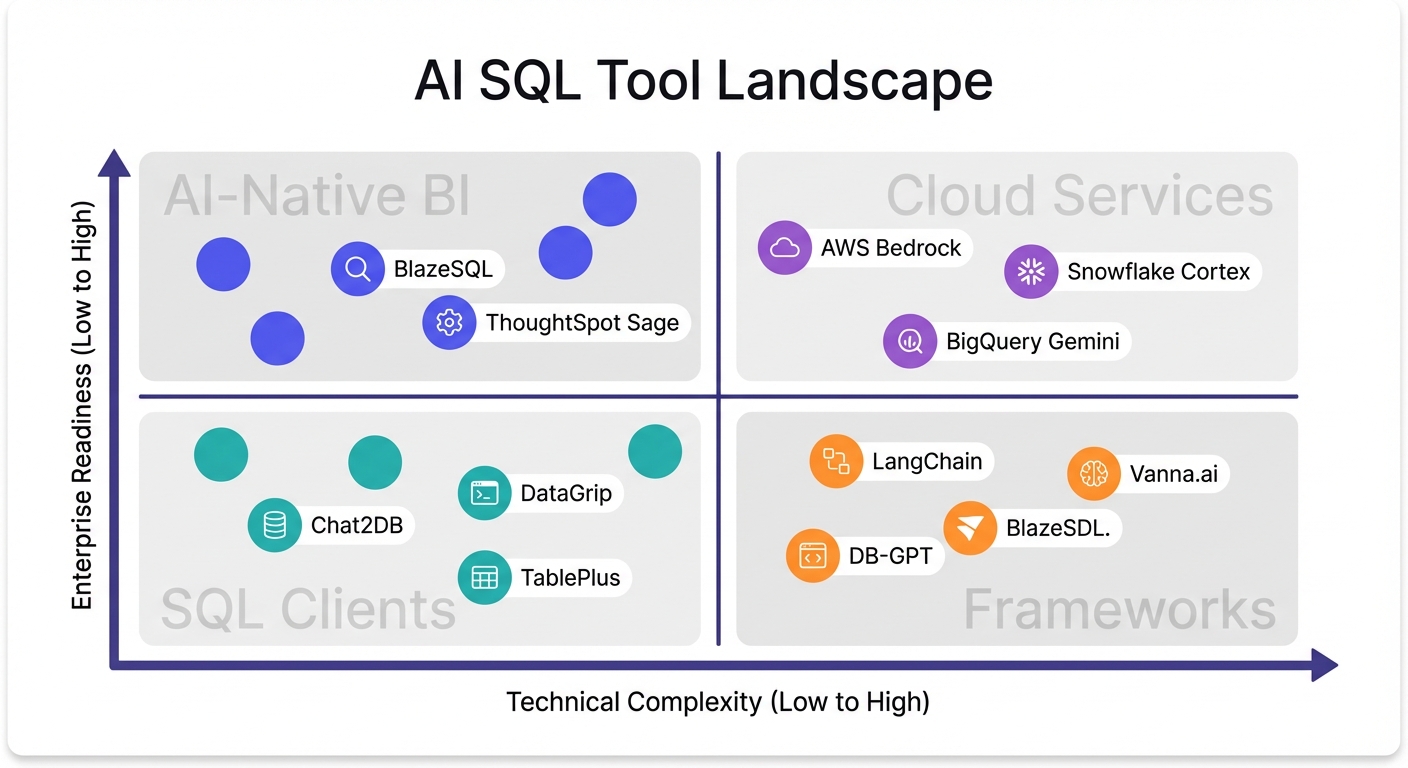
Open-Source Frameworks
These tools are strictly for developers who want to build custom text-to-SQL solutions. You get maximum flexibility, but you own the security, evaluation, and maintenance.
Vanna.ai
Vanna uses a Retrieval-Augmented Generation (RAG) approach. Instead of fine-tuning a model on your database, you feed documentation, past queries, and metadata into a vector database. The LLM references this context at query time.
Strengths:
- RAG is dramatically faster to set up than fine-tuning.
- Supports 10+ databases (Snowflake, BigQuery, Postgres).
- Can swap LLMs under the hood (OpenAI, Anthropic, local).
Limitations:
- Requires real ML/data engineering chops to deploy.
- Accuracy is 100% dependent on your training data quality.
- No application layer—you have to build the visualization UI yourself.
Best for: Technical teams with the capacity to build and maintain internal tools.
LangChain SQL Agent
LangChain provides the raw toolkit to build SQL agents. It's a box of legos, not a finished car.
Strengths:
- Total architectural control.
- Massive community and ecosystem support.
- Connects to virtually anything with a Python connector.
Limitations:
- Steep learning curve.
- Their own documentation warns: "It is not safe to run LLM-generated SQL queries on your database."
- Zero built-in governance or accuracy monitoring.
Best for: Devs building proof-of-concepts who need granular control over the agent loop.
DB-GPT
DB-GPT focuses entirely on private, local LLM deployment.
Strengths:
- Keeps data entirely in-house.
- Includes basic visualization out of the box.
- Ideal for air-gapped or hyper-secure environments.
Limitations:
- Requires serious infrastructure to host local models.
- Performance is bottlenecked by your hardware.
- Less mature documentation than commercial alternatives.
Best for: Organizations with strict data residency rules and heavy compute budgets.
AI-Native BI Platforms
These tools were built from day one around natural language. They aren't legacy dashboards with a chatbot stapled to the side.
BlazeSQL
BlazeSQL is an AI-native analytics platform. It connects to your warehouse, takes plain English questions, and outputs SQL, charts, and dashboards.
Strengths:
- Built-in reliability: features knowledge notes, training questions, and query reviews with complexity-based triage.
- Highly transparent. It explains its logic so users can verify answers.
- Actively asks clarifying questions when a prompt is ambiguous.
- Full BI features: save queries, build dashboards, export data.
- Great for hybrid teams (non-technical users get answers, technical users can edit the underlying SQL).
Limitations:
- Cloud-based generation (though a desktop version keeps results local).
- Fewer esoteric chart types compared to legacy tools like Power BI.
- Not designed for pixel-perfect, highly branded static reports.
Best for: Companies that want actual self-serve BI without a multi-month implementation, while maintaining strict data governance.
ThoughtSpot Sage
ThoughtSpot practically invented "search-based analytics" and has bolted generative AI onto that foundation with Sage.
Strengths:
- Proven enterprise scale.
- Refined search interface.
- Heavy-duty governance and security controls.
Limitations:
- Enterprise pricing puts it out of reach for lean teams.
- Requires a heavy lift to implement their semantic modeling language.
- Some users report the AI layer feels slightly disjointed from the core product.
Best for: Large enterprises with dedicated BI teams and budget to match.
Cloud-Native Enterprise Services
If you are heavily locked into one of the major cloud providers, these native text-to-SQL features are worth a look.
Snowflake Cortex Analyst
An agentic AI system built specifically for natural language analytics on Snowflake data.
Strengths:
- Deep Snowflake integration.
- High accuracy claims (90%+) if semantic models are configured perfectly.
- API-first, making it easy to embed.
Limitations:
- Useless if your data isn't in Snowflake.
- Requires heavy semantic model maintenance.
- Usage-based pricing can get unpredictable fast.
Best for: Shops running 100% on Snowflake who refuse to add third-party vendors.
AWS Bedrock Agents
AWS Bedrock lets platform teams build scalable agentic text-to-SQL pipelines using various foundation models.
Strengths:
- Access to multiple LLMs.
- Enterprise-grade scalability and error handling.
- Deep integration with AWS data lakes.
Limitations:
- You are building software, not buying a tool.
- Requires deep AWS architecture expertise.
- No BI or visualization layer included.
Best for: AWS-heavy enterprises with strong platform engineering teams.
Google BigQuery Gemini
Google embedded Gemini AI directly into the BigQuery console for query generation and code completion.
Strengths:
- Zero friction for existing BigQuery users.
- Excellent for query assistance and auto-complete.
Limitations:
- BigQuery only.
- It’s an assistant for analysts, not a self-serve tool for business users.
- Minimal governance features.
Best for: Data analysts who live in BigQuery and want an AI co-pilot.
SQL Clients with AI Features
These are traditional developer tools enhanced with LLM capabilities. They generate queries, but they aren't meant for non-technical users.
Chat2DB
An open-source SQL client attempting to replace traditional IDEs with a chat-first interface.
Strengths:
- Free and open source.
- Approachable interface for junior developers.
- Auto-generates basic visualizations.
Limitations:
- Missing advanced features found in mature IDEs.
- AI accuracy fluctuates.
- Zero enterprise governance.
Best for: Developers who want an early-stage, chat-native client.
DataGrip AI Assistant
JetBrains added an AI Assistant to DataGrip for query generation, explanation, and optimization.
Strengths:
- Flawless integration with the JetBrains ecosystem.
- Schema-aware context makes it surprisingly accurate.
- Great at explaining complex legacy queries.
Limitations:
- Requires a paid add-on to an existing subscription.
- Strictly for developers.
- No dashboarding.
Best for: Professional data engineers already living in DataGrip.
TablePlus
A beautiful, native database client that added bring-your-own-key (BYOK) AI features.
Strengths:
- Fast, native macOS/Windows interface.
- BYOK model means you control the API costs.
- One-time purchase for the core tool.
Limitations:
- AI features are bolted-on and basic.
- No collaborative or enterprise features.
Best for: Developers who want occasional AI autocomplete in their current TablePlus workflow.
Traditional BI with Bolt-On AI
The legacy BI giants have all launched AI features. If you already use these, you'll naturally evaluate them first.
Power BI Copilot
Microsoft injected Copilot into Power BI to let users query data and generate reports with natural language.
Strengths:
- Native Microsoft ecosystem integration.
- Easy to push past InfoSec if you already have Microsoft 365.
Limitations:
- Requires immaculate semantic models to function well.
- Priced as an add-on.
- Community consensus suggests reliability is still a work in progress.
Best for: Deeply entrenched Microsoft shops willing to beta-test AI features.
Tableau AI
Tableau's answer to the AI wave, offering automated insights and natural language querying.
Strengths:
- World-class visualization engine underneath.
- Leverages existing Tableau data sources.
Limitations:
- Features are immature compared to AI-native upstarts.
- Expensive.
- Mixed feedback on day-to-day reliability.
Best for: Current Tableau customers looking to experiment without migrating platforms.
Looker Conversations
Google's natural language interface for querying existing Looker models.
Strengths:
- Sits directly on top of Looker's robust semantic layer.
- Enterprise-grade security.
Limitations:
- Useless without a massive, pre-existing Looker implementation.
- User adoption seems limited.
Best for: Teams already running Looker who want conversational access.
Security Best Practices: What Your InfoSec Team Needs to Know
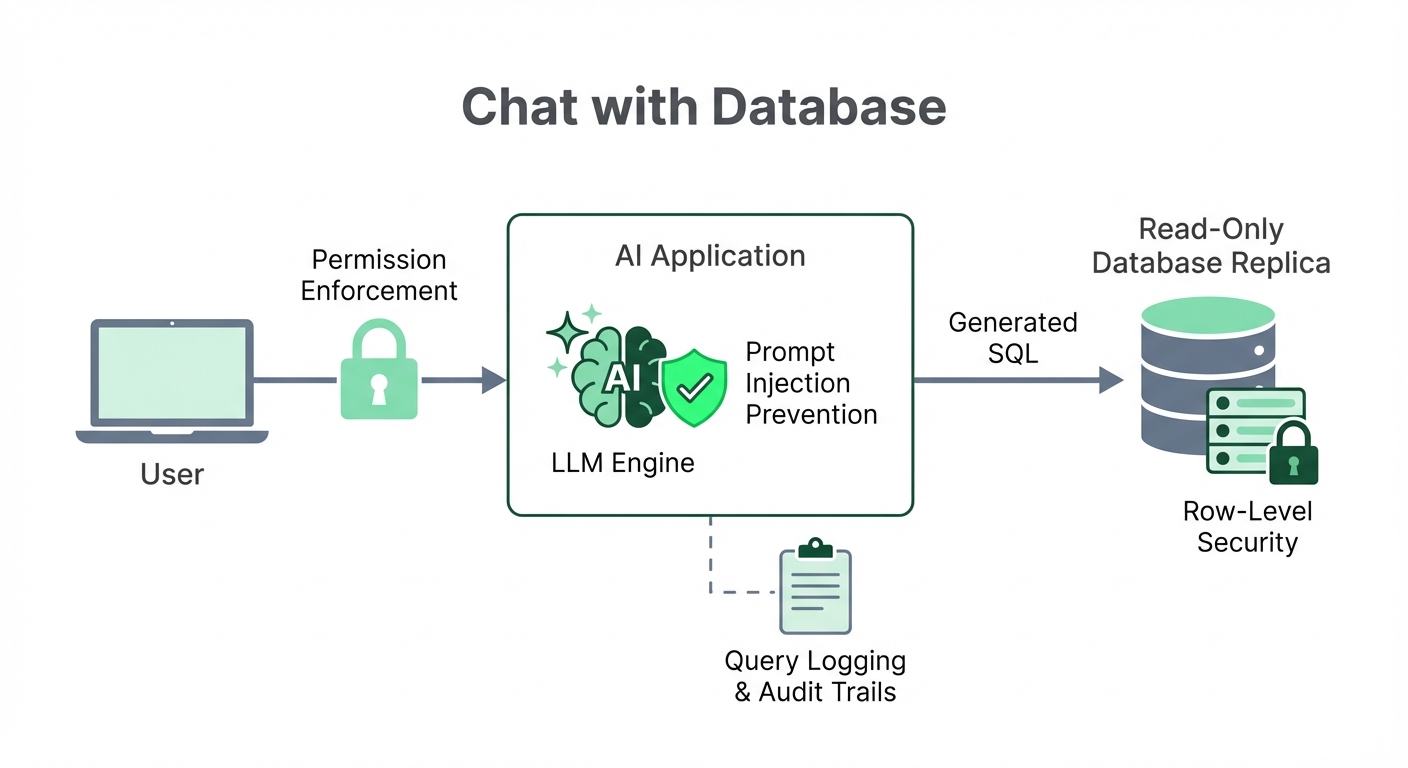
Connecting a large language model to your production database is risky. Here is how you mitigate that risk without killing the project.
The Primary Risks
- Prompt injection: A user tricks the LLM into generating malicious SQL (OWASP lists this as the #1 risk for LLM applications).
- Data leakage: Users accidentally generate queries that expose data they shouldn't see.
- Resource exhaustion: A hallucinated, horribly unoptimized query locks up your database.
Essential Safeguards
- Use read-only credentials. This is non-negotiable. The database user must have SELECT permissions only.
- Connect to a replica. Never point an AI tool at your production master database. Use a read replica to isolate performance impact.
- Implement role-based access. Enforce access controls at both the application and database levels.
- Log everything. Every query, the original prompt, the user, and the timestamp must be logged for auditing.
- Use row-level security (RLS). For highly sensitive tables, enforce RLS so users only see their authorized rows, regardless of the generated query.
If a vendor tool doesn't support these patterns natively, walk away.
Build vs. Buy: A Realistic Assessment
Should you string together LangChain components or buy an off-the-shelf platform?
The Build Path
Pros: Total control, zero vendor lock-in, and low upfront software costs. Cons: You are building a complex product, not a script. The edge cases you don't see in demos will consume your engineering team. You still have to build a visualization layer. Time-to-value is measured in quarters.
The Buy Path
Pros: Instant time-to-value. The vendor handles the brutal reliability engineering. Built-in governance and BI features. Cons: Subscription costs. Slight loss of deep customization.
The Verdict: The total cost of ownership for building is almost always higher than it looks. Factor in ongoing engineering maintenance, prompt tuning, and security patching. Unless you have a dedicated data platform team and highly specific requirements, buying an AI-native platform is the pragmatic choice.
How to Evaluate: What Actually Matters
Ignore the marketing pages. When evaluating tools, run them through this checklist:
- Test against your real database. A demo on a clean employees table proves nothing. Connect it to your messy reality.
- Evaluate the context engine. How do you teach it your metrics? Can you correct it without writing Python?
- Check for transparency. Can you see the underlying SQL? Does the tool explain why it pulled specific columns? Black boxes erode user trust immediately.
- Audit the governance. Can admins see exactly what users are asking and whether the AI got it right?
- Look past the SQL. Generating code is half the battle. Can the user build a dashboard, save the insight, or export it?
Getting Started: A Practical Path Forward
Do not roll this out to the whole company on day one. Follow this paced approach:
- Week 1: Connect the tool to a read-replica. Ask 30 representative questions. Document where it hallucinates or misunderstands your schema.
- Week 2: Feed those corrections back into the tool's business context layer (definitions, exclusions). Retest to verify it learned.
- Week 3: Invite a small, high-leverage team (like Growth or Marketing). Monitor their queries daily.
- Week 4+: Expand gradually as trust in the system's accuracy stabilizes.
What Makes Chat-With-Database Tools Actually Work
After watching countless teams deploy these tools, a crystal-clear pattern emerges. The tools that survive in production do three things well:
- They ask for clarification. When a prompt is vague, the AI asks a follow-up rather than guessing and generating a wrong answer.
- They explain their logic. Non-technical users can catch errors if the tool plainly states, "I included test accounts in this calculation."
- They give admins visibility. Tools need query review interfaces and complexity triage so data teams can constantly improve the system's accuracy.
Making the Right Choice for Your Team
The tech is finally here. The only question is matching the tool to your exact operational reality.
If you are a developer building a hyper-custom internal app, grab an open-source framework like Vanna or LangChain. If you are an enterprise locked into a massive cloud contract, test your native provider's tools.
But if your goal is to actually give business users self-serve analytics tomorrow—without drowning your data team in implementation tickets—AI-native BI platforms offer the clearest, most reliable path to production.
Like for example when I've tested AI tools that generate SQL from prompts, they sometimes hallucinate columns that don't exist. One or two that I've tried are okay-ish, but I'm skeptical that any of these tools can be trusted.
View on Reddit