


Crystal Reports Alternative: Best Replacements (2026)

Replacing Crystal Reports is weirdly hard because it isn’t just “one thing.”
Most teams use Crystal for multiple jobs at once: pixel-perfect PDFs, scheduled email distribution, embedded reporting inside apps, and the endless queue of “can you pull me a dataset?” requests.
Finding the right alternative depends entirely on which of those jobs you actually need to keep (and which ones you can retire).
Also: AI is changing BI right now. Some of it is real (natural-language analytics works well for ad hoc questions). Some of it is hype (chat bots bolted onto legacy BI often break on real schemas). Your replacement strategy needs to account for this shift without betting the business on a shiny demo.
TL;DR (key takeaways)
- Crystal Reports isn’t dead, but the clock is ticking. SAP’s lifecycle page confirms Crystal Reports 2020 mainstream maintenance ends Dec 31, 2025 and Crystal Reports 2025 ends Dec 31, 2027. Source: https://help.sap.com/docs/SUPPORT_CONTENT/crystalreports/3354088411.html
- You probably need a two-tool stack. Keep a pixel-perfect engine for invoices/statements, but add a modern analytics layer for dashboards and ad hoc queries.
- Migration is manual labor, not just licensing. A Reddit user who migrated 200+ reports to SSRS noted it took “just under a year.” Source: https://www.reddit.com/r/ssrs/comments/16m5b5p/i_just_completed_a_full_migration_from_crystal/
- Test export fidelity immediately (especially Excel). From that same migration thread: “Formatting a report in SSRS to be neatly exported into Excel was a NIGHTMARE.”
- Stop building static reports for dynamic questions. If you’re buried in “pull me a dataset” tickets, modern self-serve analytics (increasingly AI-assisted) is the right replacement for that workload.
Not sure which solution fits your specific stack? Take our 2-minute assessment to get personalized recommendations.
Step 0: Define what “Crystal Reports” means to you
Before you shop for tools, define what you actually run today. “Crystal” is usually a bundle of components, not just a designer.
Common meanings (and why it matters)
- Crystal Reports Designer (.rpt files)
This is where the pain lives: rebuilding layouts, formulas, subreports, and parameters.
- Crystal Server / SAP BusinessObjects scheduling
If you rely on bursting, emailing, and access control, you need to replace a distribution system, not just a report designer.
- Crystal Reports for Enterprise (CR4E)
Crucial note: SAP removed CR4E from SAP Business Intelligence 2025. There is no automated migration tool to move CR4E reports to “classic” Crystal. Source: https://community.sap.com/t5/technology-blog-posts-by-sap/moving-from-crystal-reports-for-enterprise-to-crystal-reports/ba-p/13579905
- Embedded Crystal runtime in a .NET app
If your headache is “Crystal runtime + Visual Studio version hell,” you need an embedded reporting SDK, not a BI platform.
Lifecycle reality check
Listicles often claim “Crystal Reports is end of life.” That’s too broad. SAP publishes mainstream maintenance dates by version here: https://help.sap.com/docs/SUPPORT_CONTENT/crystalreports/3354088411.html
Plan around these dates:
- Crystal Reports 2020: mainstream maintenance ends Dec 31, 2025
- Crystal Reports 2025: mainstream maintenance ends Dec 31, 2027
If you deal with .NET runtime changes, read this SAP Community thread: https://community.sap.com/t5/technology-q-a/32bit-crystal-reports-net-runtime-discontinued-in-dec-2025/qaq-p/13988230
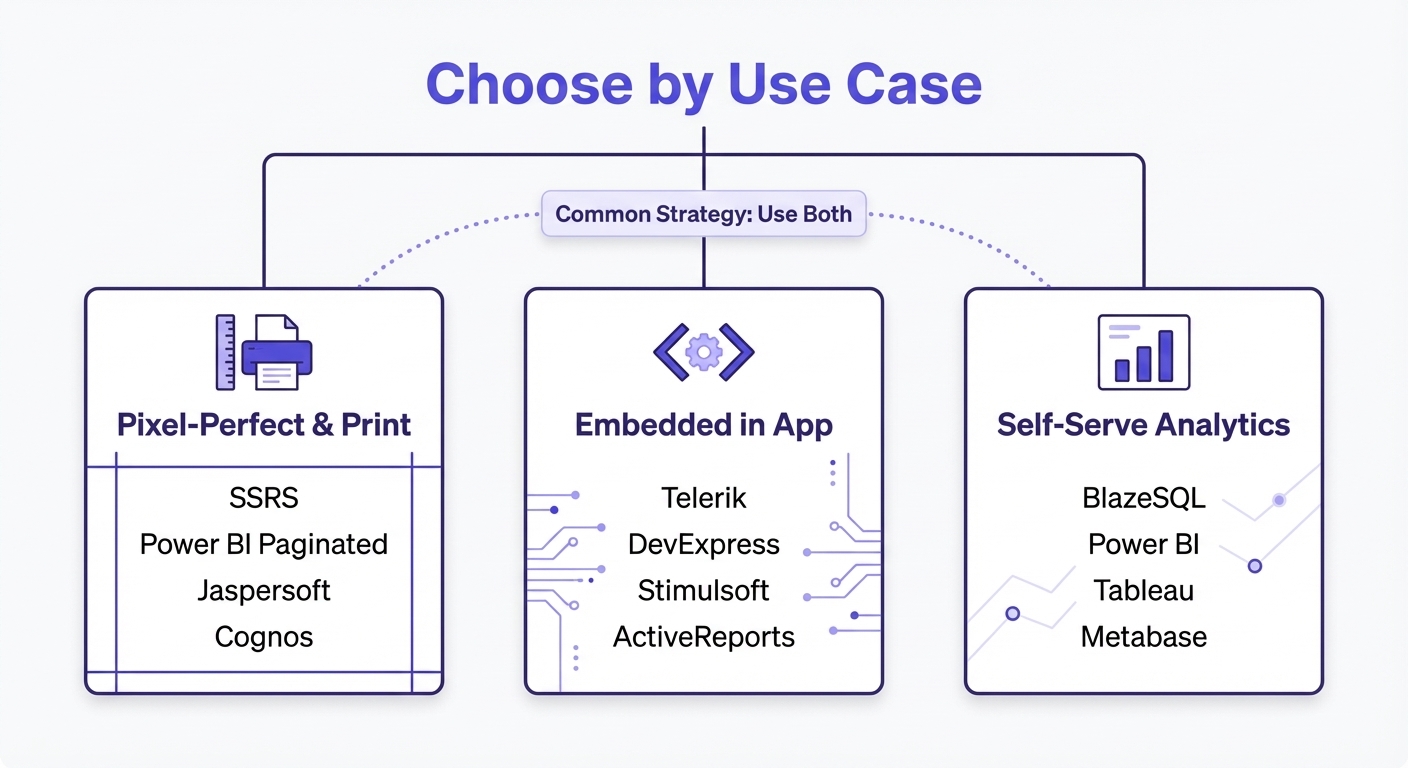
A practical decision framework (3 buckets)
Most teams fall into one (or more) of these categories:
- Pixel-perfect operational documents Invoices, statements, POs, compliance PDFs. Exact page control is the requirement.
- Embedded reporting inside an application Reports live inside your product or internal .NET app. SDKs and APIs matter more than dashboards.
- Self-serve analytics (Dashboards + Ad Hoc) The “why did this change?” and “pull me a dataset” work. Modern BI—and increasingly AI—handles this much better than static reports.
If you’re not sure which bucket you’re in, use the assessment above. It’s faster than doom-scrolling vendor pages.
What to evaluate (The checklist that actually matters)
Ignore the marketing fluff. Here is what breaks Crystal migrations:
If you need pixel-perfect reporting
- Layout control: Headers/footers, page breaks, “keep together,” multi-page tables.
- Subreports: The hidden complexity killer.
- Formula parity: Running totals, conditional formatting, and group selection logic.
- Export fidelity: PDF is easy. Excel is hard (and finance teams will riot if it looks wrong).
- Scheduling + Bursting: Can you split reports by region/customer and email them automatically?
If you need embedded reporting
- SDK + Runtime: .NET / Java support, deployment models, and versioning.
- Designer: Can non-developers maintain the reports?
- Licensing: Avoid models that penalize you for having more end-users.
- Migration tools: Do they offer .rpt conversion? (It won't be perfect, but it helps).
If you need self-serve analytics
- Time-to-answer: Can users get answers without starting a 3-month project?
- Governance: Permissions and auditing are non-negotiable.
- Reliability: Business logic and metric definitions must be consistent (critical for AI interfaces).
- Exporting: Users still need to "grab the dataset."
Best Crystal Reports alternatives (by use case)
There is no single "top rated" replacement. There is only the right tool for the specific job.
1) Best for pixel-perfect PDFs + scheduling
These are the “operational reporting” replacements—closest to the classic Crystal experience.
SQL Server Reporting Services (SSRS)
Best for: Microsoft-first, on-prem environments with SQL Server that need centralized scheduling.
Why teams choose it:
- Mature paginated reporting and subscriptions.
- You likely already own it (bundled with SQL Server).
The reality:
- Rebuilding complex Crystal logic is manual work.
- Excel export formatting is a frequent pain point.
User evidence from a migration thread:
- “Migration of 200+ reports took a single developer just under a year.”
- “Formatting a report in SSRS to be neatly exported into Excel was a NIGHTMARE.”
Source: https://www.reddit.com/r/ssrs/comments/16m5b5p/i_just_completed_a_full_migration_from_crystal/
Pricing: Bundled with SQL Server. https://www.microsoft.com/en-us/sql-server/sql-server-2022-pricing
Power BI Paginated Reports (Report Builder)
Best for: Teams standardizing on the Microsoft BI stack who want dashboards and paginated reports in one place.
Microsoft’s guidance on paginated vs. interactive: https://learn.microsoft.com/en-us/power-bi/guidance/report-paginated-or-power-bi
Gotcha: Watch the licensing.
- Premium Per User (PPU): $24/user/month.
- Premium Capacity: Starts at $4,995/month (often required for broad distribution).
Source: https://www.microsoft.com/en-us/power-platform/products/power-bi/pricing
If you just need PDFs, Premium capacity is expensive.
Jaspersoft (JasperReports Server)
Best for: Java-friendly environments needing a report server.
- Community Edition: Open-source style option available.
- Commercial: Quote-based pricing.
Comparison: https://www.jaspersoft.com/articles/crystal-reports-vs-jaspersoft-comparison
IBM Cognos Analytics
Best for: Enterprise environments prioritizing heavy governance.
This is a platform decision, not just a tool swap. Pricing anchors: https://www.ibm.com/products/cognos-analytics
2) Best for embedded reporting (Crystal inside an app)
If Crystal is embedded, you aren't shopping for Tableau. You need an SDK.
Telerik Reporting
Best for: .NET teams wanting a clear SDK, designer, and licensing model.
Pricing: https://www.telerik.com/purchase/individual/reporting.aspx Their migration pitch: https://www.telerik.com/campaigns/reporting/stellar-reports-in-telerik-reporting-the-crystal-reports-alternative
Expect manual cleanup even with their conversion tools.
DevExpress Reports (XtraReports)
Best for: .NET shops already using DevExpress controls.
Pricing: https://www.devexpress.com/buy/winforms-wpf-blazor-asp-net-maui/ Check if their "banded reporting" model maps well to your complex reports.
Stimulsoft Reports
Best for: Teams wanting broad export formats and public pricing.
Pricing: https://www.stimulsoft.com/en/online-store Comparison: https://www.stimulsoft.com/en/blog/articles/the-main-differences-of-reporting-features-between-crystal-reports-and-stimulsoft-reports
ActiveReports (.NET) by MESCIUS
Best for: Developer-centric embedded reporting with strong API support.
Migration guide: https://developer.mescius.com/blogs/how-and-why-to-convert-from-crystal-reports Pricing: https://developer.mescius.com/activereportsnet/pricing
3) Best for self-serve analytics (Dashboards + Ad Hoc)
A huge chunk of Crystal "usage" exists simply because the data team is a bottleneck.
This is where AI changes the workflow. Instead of building a static report to answer a question, users can now ask the question directly.
BlazeSQL (AI-native self-serve analytics)
Best for: Teams wanting business users to query SQL databases without waiting on analysts—while maintaining governance.
What it does:
- Connects to your SQL database/warehouse (SQL Server, Postgres, Snowflake, etc.).
- Translates natural language questions into SQL, runs the query, and visualizes the result.
- Supports dashboarding and exports (CSV/Excel).
Where it fits:
- No: It does not design pixel-perfect invoices.
- Yes: It kills the "can you pull me this data?" ticket queue.
- Context: AI reliability often fails due to lack of business context. BlazeSQL focuses on maintaining that context (metric definitions, schema notes) so the AI writes correct SQL.
If you're debating "one platform vs two," the assessment at the top helps map that out.
Power BI / Tableau / Qlik / Metabase (Classic Interactive BI)
These are solid for visual exploration, with different trade-offs:
- Power BI: The default for Microsoft shops.
- Tableau: Superior visuals, but generally not for operational docs.
- Qlik: Strong associative engine.
- Metabase: Lightweight, great for SQL-heavy teams.
The catch: These tools assume someone builds the model/dashboard first. AI-native approaches are reducing that setup cost.
A sane migration plan (what works in practice)
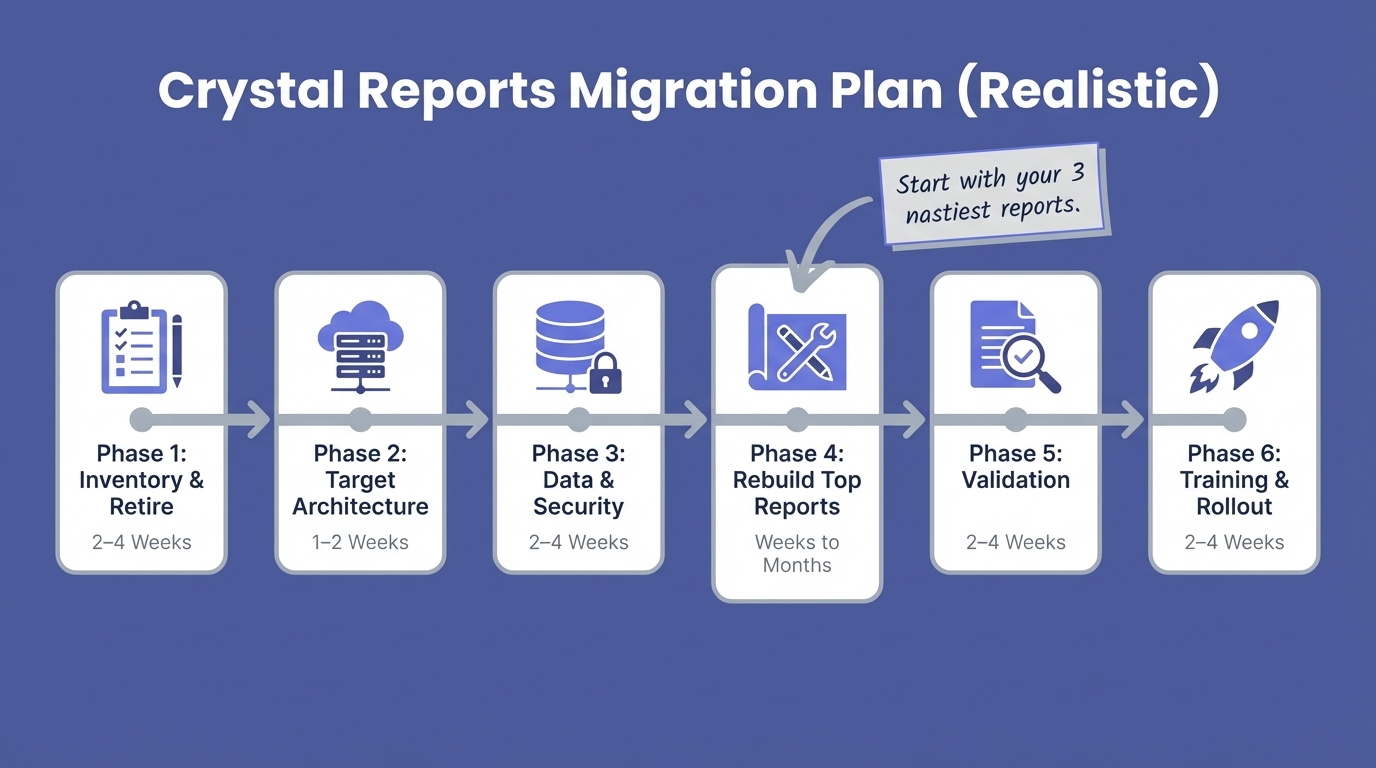
Most migrations fail because teams try to "replace everything" at once.
Do this instead:
- Inventory: Count your .rpt files. Identify owners and schedules.
- Retire Dead Weight: Many teams find 30–40% of reports are unused. Validate this, but don't migrate zombies. (Source: https://cx-reports.com/blog/crystal-reports-migration-roadmap)
- Rebuild the Top 10–20: These run the business. Move them first.
- Parallel Run: Validation takes longer than the build. Run old and new side-by-side.
- Migrate the Long Tail Opportunistically: This is where self-serve analytics can save you from rebuilding hundreds of "one-off" reports.
A benchmark to keep you honest
“Migration of 200+ reports took a single developer just under a year.”
Source: https://www.reddit.com/r/ssrs/comments/16m5b5p/i_just_completed_a_full_migration_from_crystal/
Treat that as your baseline. Big libraries take months.
Pitfalls to test in Week One
- Formula translation: Crystal logic rarely maps 1:1.
- Subreports: Often the source of real complexity.
- Excel exports: A huge hidden requirement.
- Scheduling: "Building" the report is different from "delivering" it.
- Connectivity: 64-bit vs 32-bit ODBC drivers can break things quietly.
Pricing & TCO (Why licenses are the wrong metric)
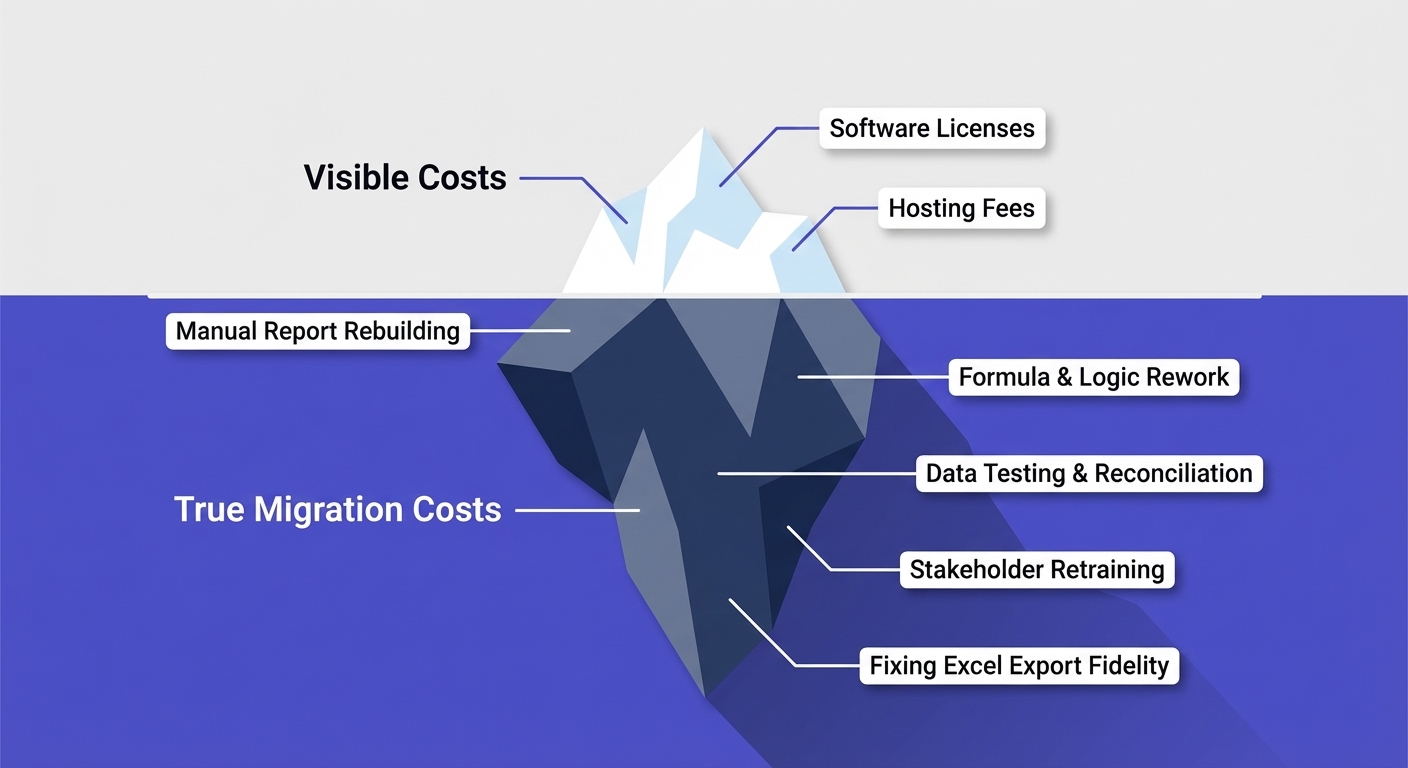
Licenses are the tip of the iceberg. With Crystal replacements, migration and maintenance are the real costs.
Public pricing anchors (Sanity check)
- SAP Crystal Reports: $495/named user (SAP product page)
https://www.sap.com/products/data-cloud/crystal-reports.html
- Power BI Premium Per User: $24/user/mo; Capacity: $4,995/mo+
https://www.microsoft.com/en-us/power-platform/products/power-bi/pricing
- Telerik Reporting: $599/dev/year
https://www.telerik.com/purchase/individual/reporting.aspx
- DevExpress: $799.99/dev/year
https://www.devexpress.com/buy/winforms-wpf-blazor-asp-net-maui/
- Stimulsoft: $799.95 (single dev)
https://www.stimulsoft.com/en/online-store
- ActiveReports: Public per-dev pricing
https://developer.mescius.com/activereportsnet/pricing
SSRS pricing is effectively "SQL Server pricing": https://www.microsoft.com/en-us/sql-server/sql-server-2022-pricing
The cost model that works
Build your business case with this logic:
- Reports to migrate = Total reports × (% still active)
- Build effort = Hours per report × Labor rate
- Validation effort = Stakeholder time (usually the bottleneck)
- Ongoing load = New questions per week (Self-serve analytics reduces this cost)
FAQ
Is Crystal Reports being discontinued?
Not immediately. SAP has specific maintenance dates. Mainstream maintenance for v2020 ends Dec 2025; v2025 ends Dec 2027. Source: https://help.sap.com/docs/SUPPORT_CONTENT/crystalreports/3354088411.html
Is Power BI a good replacement for Crystal Reports?
It depends. If you need pixel-perfect output, you specifically need Power BI Paginated Reports. Be careful with licensing costs (PPU vs Capacity). Standard Power BI dashboards are not a 1:1 replacement for invoices. Microsoft guidance: https://learn.microsoft.com/en-us/power-bi/guidance/report-paginated-or-power-bi
What’s the difference between Crystal Reports and SSRS?
Both are paginated tools. The differences are in expression languages, layout logic (subreports), export behavior (Excel), and deployment. If you choose SSRS, test your Excel exports early.
What to do next (This week's plan)
- List your top 20 reports. Label them: “Must be pixel-perfect” vs. “Just needs data.”
- Document distribution. Who gets what, when, and does the format matter?
- Bake-off. Pick your 3 nastiest reports and try to rebuild them in 2–3 tools.
- Decide your stack. One tool vs. two (Two is often safer).
- Fix the ad hoc queue. If "pull me a dataset" is killing your team, add a self-serve analytics layer alongside your reporting engine.