


Domo Pricing 2026: Real Costs, Credit Traps & Hidden Fees
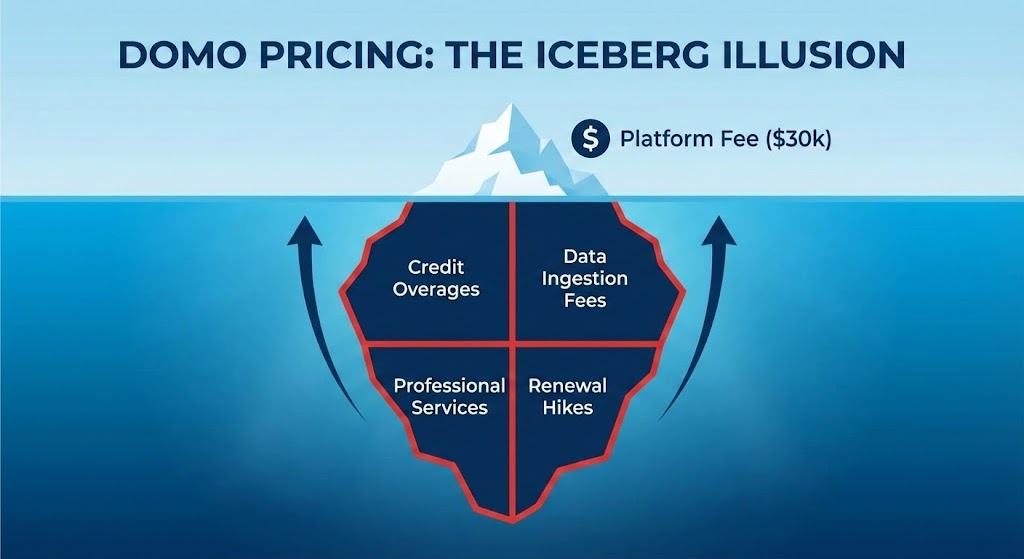
If you visit Domo’s official pricing page, you won’t find a single dollar sign. Instead, you will find vague promises of flexibility and a "Contact Sales" button.
For most decision-makers, this opacity is a major red flag.
Why hide the price? Research from 2025 market data, leaked proposals, and user reports suggests the answer is simple: Domo is expensive. With a complex "Consumption Credit" model and a history of significant price hikes upon renewal, many organizations are finding themselves locked into contracts that spiral into the six figures.
In this guide, we break down exactly how Domo’s pricing works, the hidden "traps" in their contract structure, and the best cost-effective alternatives to consider.
The Short Answer: How Much Does Domo Cost?
Unlike tools that charge a simple per-user fee (like Power BI at $10/month), Domo uses a bespoke model based on "Credits" and platform fees.
Based on aggregated data from pricing intelligence platforms (like Vendr) and user reports, here are the realistic pricing tiers for 2025:
| Company Size | Estimated Annual Cost | What You Typically Get |
|---|---|---|
| Small Business | ~$30,000 - $50,000 | Minimum entry contract. Limited credits (~25M rows). |
| Mid-Market | $75,000 - $135,000 | ~50 users. 250M rows. Real-time connectors. |
| Enterprise | $212,000 - $1M+ | Unlimited users. High data volume. Premium support. |
| Per-User Fee | ~$750 - $1,000 | Annual cost per user (often bundled). |
Key Takeaway: The "floor" price for a viable Domo implementation is roughly $30,000 per year. If you are a smaller team, Domo is likely priced out of range.
The Hidden Trap: The "Credit" Consumption Model
The biggest complaint among Domo users isn't just the high price—it's the unpredictability.
Domo operates on a Credit Consumption Model. You purchase a bucket of credits upfront. Everything you do in the platform burns these credits.
- 1 Credit is roughly equal to 1 Million Rows of data.
This sounds generous, but the system is designed to burn credits fast via three mechanisms:
1. The "Double-Counting" of ETL
This is the most cited frustration in user reviews. When you use Domo’s ETL (Extract, Transform, Load) tools to clean your data, you are often charged for the rows twice.
- Input Cost: You pay credits to ingest the raw data.
- Output Cost: You pay credits again to save the cleaned data.
- Result: A simple data transformation costs double what you expected.
2. The Overage Surprise
Unlike cloud providers (AWS/Azure) that let you set hard budget caps, users report that Domo often allows you to exceed your credit limits without warning.
- The Consequence: You receive a massive "true-up" bill for overages at the end of the quarter, or sales reps use the overage as leverage to force you into a more expensive multi-year contract.
3. Renewal Shock (The 2.5x Hike)
Vendor lock-in is real. Once your data logic is built inside Domo’s proprietary "Magic ETL," leaving is technically difficult. Users on forums have reported renewal offers increasing by 2.5x (150% hike), leaving them with little choice but to pay.
Top 3 Alternatives to Domo (2025)
If the six-figure price tag and credit anxiety aren't for you, here are the top three alternatives.
1. BlazeSQL: Best for AI-Powered, No-Code Data Analysis
BlazeSQL has rapidly gained popularity by making data analysis accessible to everyone in an organization, regardless of their technical skills. It features a powerful SQL AI analyst and conversational assistant that converts plain English requests directly into optimized SQL queries.
As a no-code platform, BlazeSQL allows users to connect to databases, visualize data effortlessly, and generate real-time insights simply by asking questions. This empowers business users—from marketing to operations—to unlock valuable information without relying on data teams or knowing SQL.
Key Features:
- AI Analytics Chatbot: An AI-driven chatbot that transforms natural language questions into SQL queries, delivering easy-to-understand insights instantly.
- Robust Data Security: Sensitive data never leaves your environment. BlazeSQL connects directly to your existing database (Snowflake, SQL Server, etc.) so you don't pay "storage credits" to move it.
- Automated Reporting: Schedule customized reports to be generated and delivered automatically at set intervals.
Pros:
- Enables true self-service analytics without any SQL knowledge.
- Drastically reduces the time to insight through conversational AI.
- Eliminates "Credit Anxiety"—you aren't penalized for running more queries.
2. Microsoft Power BI
Best for: Microsoft-Heavy Organizations
If your company already runs on Office 365, Power BI is the undeniable value leader.
- The Cost: Power BI Pro licenses cost just $10/user/month.
- The Math: You could license 250 users on Power BI for the same price as Domo’s minimum starting contract ($30k).
- Pros: Extremely low entry cost, industry-standard visuals.
- Cons: Requires learning DAX (coding language) for complex reports; not as "mobile-first" as Domo.
3. Tableau
Best for: Advanced Data Visualization
If your main attraction to Domo was the beautiful dashboards, Tableau is the industry standard for visuals.
- The Cost: ~$70/user/month for Creators.
- Pros: Superior visualization capabilities and a massive community of talent.
- Cons: Still expensive compared to Power BI, but generally more transparent and predictable than Domo’s consumption model.
Summary: Is Domo Worth the Premium?
Domo is a powerful "luxury" product. It combines a database, an ETL tool, and a visualization engine into one mobile-friendly package. For executives with unlimited budgets who want to run their business from an iPhone, it is a strong contender.
However, for the majority of data teams in 2025, the Total Cost of Ownership (TCO) is hard to justify.
- Choose BlazeSQL if: You want to modernize. You want to empower your team to get answers instantly via AI, keep your data in your own database, and avoid "per-row" fees.
- Choose Power BI if: You want value. You are a Microsoft shop looking for the lowest price per seat ($10/mo).
- Choose Domo if: You have a budget of $100k+ and specifically need their proprietary "all-in-one" mobile experience.
Frequently Asked Questions (FAQ)
Does Domo have a free version?
Domo offers a "Free Forever" version for up to 5 users, but it is extremely limited in data rows and features. It is primarily a lead-generation tool. Once you exceed the limits, you are pushed toward the $30k+ contracts.
Why is Domo so expensive?
Domo charges for the entire stack: storage, computing (ETL), and visualization. Most modern stacks separate these (e.g., Snowflake for storage, BlazeSQL for analytics), which is often cheaper and more flexible.
How does Domo pricing compare to Tableau?
Tableau charges per user ($70/mo). Domo charges based on consumption (credits). For active data teams, Domo is almost always more expensive because every data refresh and transformation costs money.