


15 Best Looker Studio Alternatives in 2026: An Honest Comparison

Looker Studio is free—until it isn't.
If you’re reading this, you’ve likely hit the "free tier" ceiling. Maybe your connector fees just spiked to $500/month because you added a Facebook Ads source. Maybe your dashboard times out every time you select a date range longer than a week. Or maybe managing reports for 20 clients has become a full-time job.
You aren't alone. Thousands of teams start with Google's ecosystem and hit the exact same wall.
This guide cuts through the marketing fluff. We’re looking at what actually works as a replacement, what it costs (including the hidden stuff), and the specific tradeoffs you’ll face with each.
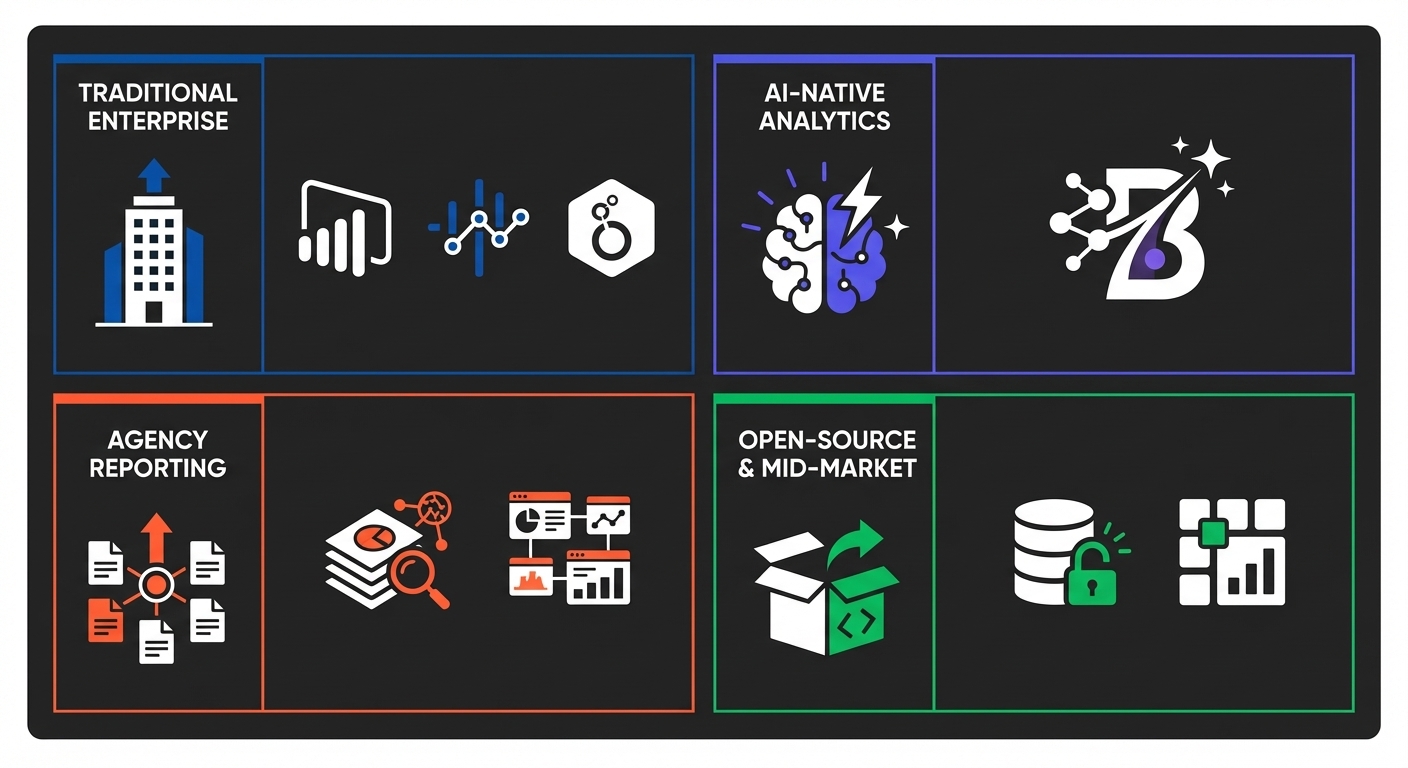
TL;DR: The Quick Picks
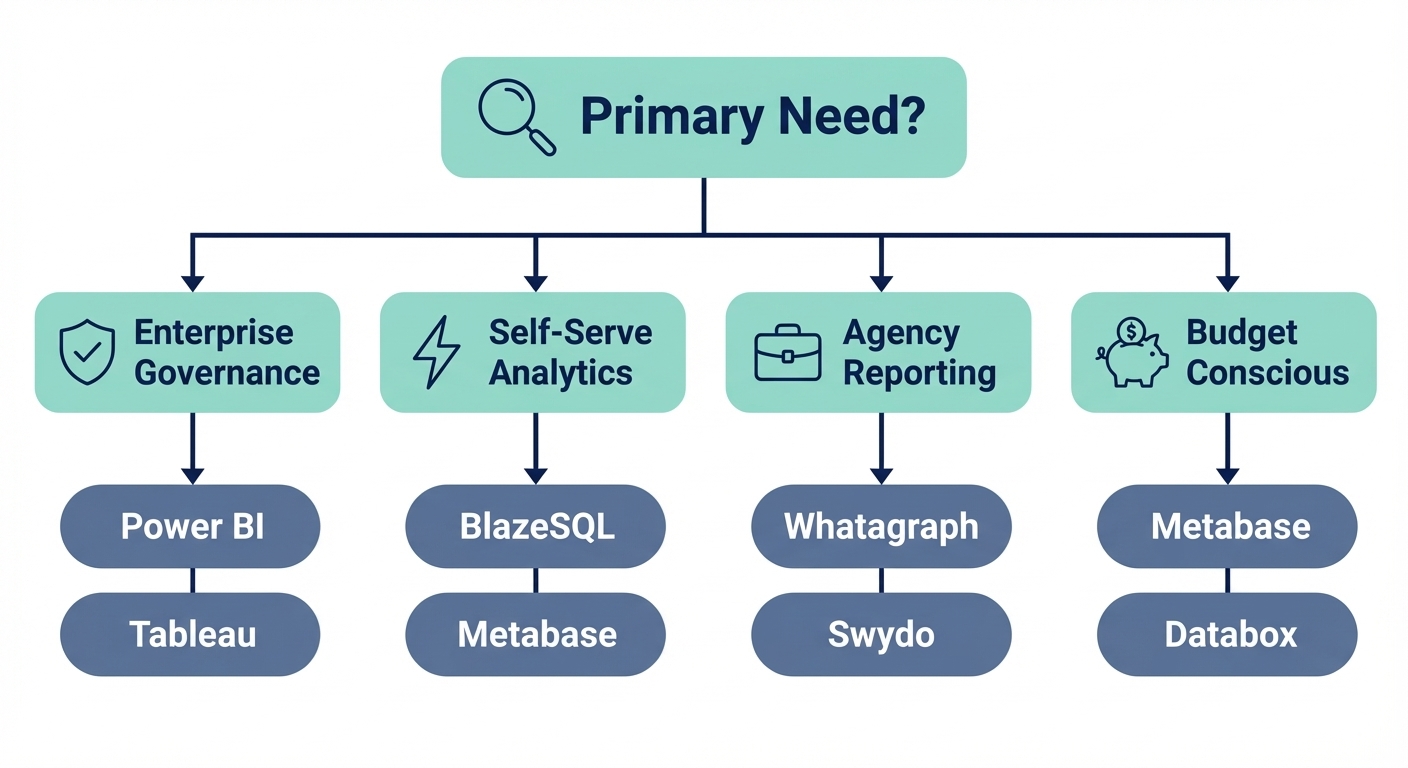
In a hurry? Here is the high-signal summary based on your primary constraint:
| Use Case | Best Alternative | Why |
|---|---|---|
| Microsoft ecosystem + enterprise governance | Power BI | Seamless integration, strong security, $14/user/month |
| Advanced visualization + big data | Tableau | Industry-leading visuals, handles massive datasets |
| Self-serve analytics without SQL bottleneck | BlazeSQL | AI-native querying, business context learning, fast ad hoc answers |
| Marketing agency with multiple clients | Whatagraph | Purpose-built for agencies, white-labeling, 200+ integrations included |
| Budget-conscious small team | Metabase | 100% free open-source, self-hosted control |
| Quick marketing dashboards | Databox | Free tier available, mobile-first, KPI tracking |
Still debating? We built a 2-minute workflow to match your specific tech stack to the right tool.
Finding the right Looker Studio alternative depends on your specific situation—team size, data sources, technical resources, and how you'll actually use it. Our assessment matches you to the best options for your needs.
Why Teams Actually Leave Looker Studio
Let’s be honest about the friction points. Knowing why you are leaving ensures you don't just trade one headache for another.
1. The Connector Cost Trap
Looker Studio markets itself as free. It is—if you only use Google Analytics, Ads, and Sheets. The second you need HubSpot, Salesforce, or Facebook Ads, you are paying for third-party connectors (Supermetrics, etc.).
The math gets ugly fast:
| Scale | Monthly Connector Costs |
|---|---|
| 5 clients/data sources | ~$200/month |
| 15 clients | $300–$500/month |
| 25 clients | $600–$800/month |
| 50+ clients | $5,000+/month |
We saw a boutique agency with 18 clients spending 12+ hours a week just fixing broken connector links. That’s not sustainable.
2. Performance Issues (The "Spinning Wheel")
The community sentiment is blunt. A Reddit thread on migrating to Looker Studio has a top comment with 97 upvotes that just says: "Change jobs."
Common dealbreakers:
- Query Timeouts: Anything over 6 minutes fails.
- Data Limits: MySQL connector caps at 150k rows.
- Fragility: Reports break randomly when APIs update.
3. The Agency Scaling Wall
If you run an agency, the breaking point is usually 10-15 clients. At that stage, managing permissions, duplicating reports, and lacking native white-labeling turns operations into a nightmare. You end up spending more on labor to maintain the "free" tool than you would on a paid solution.
4. Lack of Advanced Features
Compared to Power BI or Tableau, Looker Studio is lightweight. You get:
- Maximum 5 blended data sources.
- 50 charts per page max.
- No real AI features (Gemini is in Preview, but don't expect it to stay free).
- Limited Row-Level Security (RLS).
When to Stay: If you are a small team, fully in the Google stack (BigQuery/GA4), and have zero budget, Looker Studio is still a solid choice. If you've read this far, though, you've likely outgrown it.
The Evaluation Framework
Don't just compare feature lists. Judge tools on these five operational realities:
- Total Cost of Ownership: Not just the license fee. Add connector costs + maintenance hours.
- Data Source Reality: Does it actually connect to your SQL database or niche CRM, or does it claim to via a buggy third party?
- User Skill Level: Can your marketing manager use it, or do you need a SQL analyst for every chart?
- Self-Service: Can the CEO answer their own questions, or does every query become a ticket in the data team's backlog?
- Governance: (For enterprise) SSO, audit logs, and row-level security are non-negotiable.
Comparison Matrix: The Top 15
A side-by-side view of the landscape:
| Tool | Best For | Starting Price | Free Trial | Integrations | White-Label | AI Features |
|---|---|---|---|---|---|---|
| Power BI | Microsoft ecosystem | $14/user/mo | Yes (Desktop) | 100+ | Via embedding | Copilot (Premium only) |
| Tableau | Advanced visualization | $75/user/mo | Yes | 90+ | Limited | Einstein (Tableau+ only) |
| Looker Enterprise | Data teams with LookML | Contact sales | Yes | 100+ | Yes | Via Gemini |
| BlazeSQL | Self-serve analytics | Seat-based | Yes | 12+ SQL DBs | No | AI-native |
| Whatagraph | Marketing agencies | $223/mo | 7-day | 200+ | Yes | Limited |
| Swydo | Agency reporting | $49/mo | 14-day | 30+ | Yes | No |
| AgencyAnalytics | Digital marketing | $79/mo | 14-day | 80+ | Yes | Limited |
| Metabase | Self-hosted BI | Free (OSS) | N/A | 20+ | Self-hosted | No |
| Databox | KPI dashboards | Free tier | N/A | 100+ | Higher tiers | No |
| Klipfolio | SMB dashboards | $50/mo | 14-day | 100+ | Higher tiers | No |
| Domo | Enterprise all-in-one | Contact sales | Yes | 1000+ | Yes | Yes |
| Qlik Sense | Associative analytics | Contact sales | Yes | 100+ | Yes | Yes |
| Sisense | Embedded analytics | Contact sales | Yes | 50+ | Yes | Yes |
| Supermetrics | Data connectors | $20/mo | 14-day | 200+ | N/A | No |
| Google Analytics 4 | Web analytics only | Free | N/A | Google only | No | Basic AI |
Detailed Breakdown by Category
Category: Traditional Enterprise BI
The heavy hitters. Powerful, secure, but steeper learning curves.
Power BI
Best for: Microsoft shops and enterprise governance.
If you use Office 365, this is the default choice. The integration is seamless—embed reports in Teams, manage access via Azure AD. It’s robust and secure.
The Tradeoff:
- Cost Creep: Pro is cheap ($14/mo), but AI features (Copilot) require Premium Capacity at $4,995/month. That is a massive jump.
- Complexity: DAX (the formula language) is not intuitive.
- Resources: It’s a resource hog on local machines.
Verdict: The safe enterprise bet. Just don't expect the cool AI stuff without a five-figure budget.
Tableau
Best for: Visual storytelling and massive datasets.
Tableau is the gold standard for "pretty" data. It handles volumes that choke Looker Studio and offers incredible drill-down capabilities.
The Tradeoff:
- Price: Creators cost $75/mo.
- Learning Curve: It is a professional tool requiring professional skills.
- AI Costs: Einstein features are locked behind the opaque "Tableau+ Bundle" pricing.
Verdict: If visualization is your product, pay for Tableau. If you just need a chart, it's overkill.
Looker (Enterprise)
Best for: Serious data teams needing version control (LookML).
Note: This is not Looker Studio. This is Google's enterprise platform. Its superpower is LookML—a modeling language that ensures metrics are defined centrally and reused everywhere.
The Tradeoff:
- Price: Usually starts around $50k/year.
- Talent: You need a dedicated team who knows LookML.
Verdict: Powerful, but not a simple "upgrade" from Studio. It's a platform switch.
---
Category: AI-Native Analytics
Built for "asking questions" rather than "building dashboards."
BlazeSQL
Best for: Teams with SQL databases who want answers without the analyst bottleneck.
BlazeSQL isn't about drag-and-drop; it's about text-to-data. It connects to your database (Snowflake, Postgres, etc.) and lets non-technical users ask questions in English. The system "learns" your business context so it stops making rookie mistakes.
Key features:
- Direct querying of SQL databases/warehouses.
- Dashboards included, but the focus is ad hoc answers.
- Governance tools to review AI queries.
The Tradeoff:
- Database Required: Works best with a warehouse, not direct API connections to niche SaaS tools.
- Not for Agencies: It’s for internal analytics, not white-labeled client PDFs.
Verdict: If your problem is "I can't get answers fast enough" rather than "I need a prettier chart," this is the solve.
See how BlazeSQL works for your specific database setup.
---
Category: Agency-Specific Reporting
Tools that fix the multi-client scaling nightmare.
Whatagraph
Best for: Agencies who want to stop paying per-connector fees.
Whatagraph’s killer feature is pricing: 200+ integrations are included. You don't pay extra when a client adds LinkedIn Ads. It is built for automated delivery and white-labeling.
The Tradeoff:
- Niche: It is strictly for marketing data. Not a general BI tool.
- Base Cost: Starts higher than Looker Studio, but becomes cheaper at scale.
Verdict: If connector fees are eating your agency margins, the math here works in your favor.
Swydo
Best for: Agencies needing predictable per-client pricing.
Swydo simplifies the model: you pay by the client, not the data source. It’s great for automated monthly reports.
The Tradeoff:
- Fewer integrations (30+) compared to Whatagraph.
- No AI features.
Verdict: Affordable and predictable for smaller agencies.
AgencyAnalytics
Best for: Agencies with a heavy SEO focus.
Combines reporting with actual SEO tools (rank tracking, site audits). If you do SEO, this kills two birds with one stone.
Verdict: The default choice for SEO agencies.
---
Category: Open-Source & Mid-Market
Cost-effective control.
Metabase
Best for: Tech teams who want free, self-hosted control.
Metabase is fantastic open-source software. It’s free (if you self-host), clean, and beloved by developers.
The Tradeoff:
- "Free" isn't Free: You need DevOps time to maintain the server.
- No AI: You’re on your own for analysis.
Verdict: The best "free" option, assuming you have the engineering resources to support it.
Databox
Best for: Small teams needing mobile-first KPIs.
Databox is great for executives who just want to check numbers on their phone. The free tier is genuinely usable for small setups.
The Tradeoff:
- Limited deep analysis capabilities.
- Data refresh limits on lower tiers.
Verdict: Good starting point, but you'll likely graduate from it eventually.
Klipfolio
Best for: SMBs needing a middle ground.
Affordable ($50/mo start) with good agency features at higher tiers.
Verdict: Solid, though the community is smaller than the giants.
---
Category: Heavy Enterprise & Embedded
For big budgets and product integration.
- Domo: An all-in-one platform (ETL + Store + BI). Powerful, but expensive and proprietary.
- Qlik Sense: Unique "associative" engine allows for deep exploration, but requires a mindset shift and heavy investment.
- Sisense: The leader for embedded analytics (putting charts inside your product).
---
Category: The Band-Aid
- Supermetrics: To be clear, this isn't a BI tool. It's a connector service. It makes Looker Studio usable by fixing the data pipes. If you love Looker Studio but hate the broken connections, this is your patch. But it won't fix the performance or visualization limits.
---
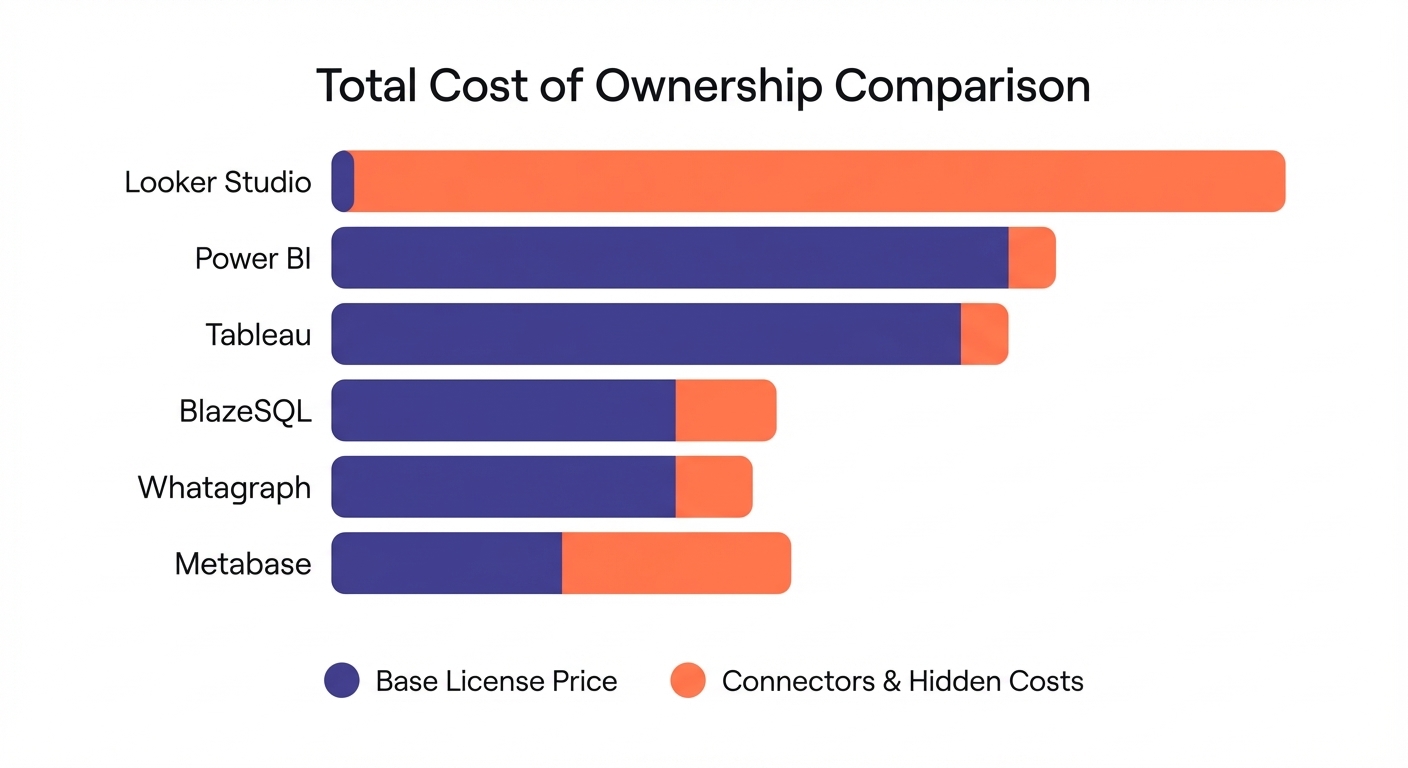
The Real Cost (TCO)
Sticker price is a lie. Here is what you actually pay—including the analyst hours most teams ignore.
The Hidden Cost Nobody Talks About: Ad-Hoc Queries
Traditional BI tools have a dirty secret: the license is cheap, but every question that isn't already on a dashboard becomes a ticket. An analyst spends 30 minutes writing SQL, validating results, and formatting the answer. At $75/hour loaded cost, that's $37.50 per question.
If your team asks 50 ad-hoc questions per month (low estimate for a growing company), that's $1,875/month in analyst time—on top of your BI license.
AI-native tools like BlazeSQL flip this: the AI handles the ad-hoc queries in seconds. So while the seat price looks higher, the total cost of getting answers is often dramatically lower.
Scenario 1: Small Team (10 users, Google data only)
- Looker Studio: $0 license + $500–1,000/mo analyst time for ad-hoc = $500–1,000/mo real cost
- Power BI Pro: $140/mo + similar analyst overhead = $640–1,140/mo
- BlazeSQL: $400/mo (AI handles the ad-hoc) = $400/mo
Scenario 2: Growing Company (25 users, mixed data)
- Looker Studio: $500–$1,000/mo connectors + $2,000+/mo analyst time = $2,500–3,000/mo
- Power BI Pro: $350/mo + analyst overhead = $2,350/mo+
- BlazeSQL: $1,200/mo (self-serve eliminates most ad-hoc tickets) = $1,200/mo
Scenario 3: Agency (50+ Clients)
- Looker Studio: $5,000+/mo (Connector fees + labor to fix breaks).
- Whatagraph/AgencyAnalytics: Custom/Agency pricing (purpose-built for this).
- Power BI Premium: $4,995/mo.
Other Hidden Costs:
- Training: Power BI/Tableau require weeks of learning.
- Maintenance: Self-hosted Metabase requires dev time.
- Migration: Rebuilding dashboards takes 2-4 weeks.
- Opportunity cost: Questions that never get asked because "it's not worth bothering the data team."
The Migration Reality
Switching tools isn't a "File > Export" situation.
Key Advice:
- Don't migrate everything. Most teams only use 20% of their reports. Inventory what actually matters first.
- Define metrics. This is the time to agree on what "Churn" actually means before you code it into the new tool.
- Augment first. You don't have to kill Looker Studio on day one. Keep it for basic GA4 tracking, and add BlazeSQL or Power BI for the heavy lifting.
FAQ
What is the best free alternative? Metabase. But only if you can self-host. If you want a SaaS tool with a free tier, try Databox.
Can I get AI features without paying $5k/month? Yes. BlazeSQL offers AI-native analytics at a fraction of the cost. Power BI and Tableau lock real AI behind expensive enterprise gates.
What is best for agencies? Whatagraph (general marketing) or AgencyAnalytics (SEO focus). Looker Studio's lack of white-labeling and connector costs make it a bad fit for scaling agencies.
Is Power BI worth it if I don't use Microsoft? Probably not. You lose the SSO/Teams integration benefits. You're better off looking at a tool that plays nicer with your specific stack.
Final Verdict: How to Choose
Let’s simplify this.
- Go Power BI if you live in Microsoft Teams and need governance.
- Go Tableau if you have a data team and need beautiful, complex visuals.
- Go BlazeSQL if you have a SQL database and want to solve the "waiting for answers" bottleneck.
- Go Whatagraph if you are an agency bleeding margin on connector fees.
- Go Metabase if you are technical, broke, and want control.
The worst choice? Staying with a tool that costs you 10 hours a week in maintenance just because the monthly license fee says "$0."
Ready to try something new?
If you want to test self-serve analytics on your own data, you can connect BlazeSQL and start asking questions in minutes.
Try BlazeSQL free and see if it fits your workflow. No sales call required to get started.
For other tools, most offer trials—use them on your actual data, not just the sample sets, to see where the bodies are buried.
Expect bugs, lots of bugs. Also lag.
View on Reddit