


5 Best Crystal Reports Alternatives for 2026 (End of Life Guide)
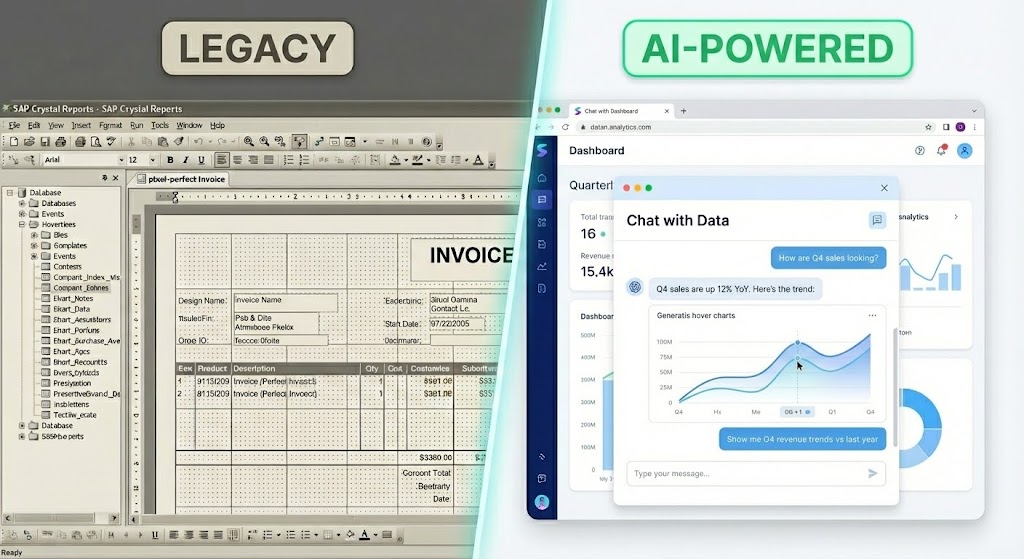
For over two decades, SAP Crystal Reports was the default choice for operational reporting. If you needed a pixel-perfect invoice, a complex financial statement, or a paginated document for a board meeting, Crystal was the gold standard.
But in 2026, the landscape has shifted permanently.
With SAP confirming the discontinuation of the 32-bit .NET runtime in December 2025 and the removal of Crystal Reports for Enterprise (CR4E) from upcoming releases, organizations are scrambling for a successor.
Beyond these technical deadlines, the primary driver for switching is modernization. Today’s business leaders—from Heads of Data to Marketing Directors—are moving away from static, IT-dependent reporting backlogs. They are demanding dynamic, AI-driven, self-service analytics.
If you are looking for a Crystal Reports alternative, you generally fall into one of two camps:
- The "Modernizers" (Business Leaders): You want to replace static PDF reports with dynamic, AI-powered insights that business users can generate themselves.
- The "Developers" (Technical Leads): You need a direct technical replacement to generate pixel-perfect forms (like invoices) embedded in a legacy .NET application.
Below, we rank the top 5 alternatives for 2025, starting with the best solution for modern, AI-powered analysis.
Quick Comparison: Top 5 Alternatives
| Alternative | Best Use Case | Pricing Model | AI Capabilities |
|---|---|---|---|
| 1. BlazeSQL | AI-Powered Self-Service (Best Overall) | SaaS / Subscription | High (Native SQL AI) |
| 2. Power BI | Corporate Dashboards | User/Month + Capacity | Moderate (Copilot) |
| 3. SSRS | 1:1 Static Report Replacement | Included w/ SQL Server | Low / None |
| 4. DevExpress | Embedded .NET Apps | Per Developer License | Low |
| 5. Tableau | Advanced Data Visualization | Per User / Creator | Moderate |
1. BlazeSQL: Best for AI-Powered, No-Code Data Analysis
BlazeSQL has rapidly gained popularity by making data analysis accessible to everyone in an organization, regardless of their technical skills. It features a powerful SQL AI analyst and conversational assistant that converts plain English requests directly into optimized SQL queries.
As a no-code platform, BlazeSQL allows users to connect to databases, visualize data effortlessly, and generate real-time insights simply by asking questions. This empowers business users—from marketing to operations—to unlock valuable information without relying on data teams or knowing SQL.
Key Features:
- AI Analytics Chatbot: An AI-driven chatbot that transforms natural language questions into SQL queries, delivering easy-to-understand insights instantly.
- Data Visualization: Interactive dashboards make it simple to create visualizations, including line and bar charts, with minimal effort.
- Automated Reporting: Schedule customized reports to be generated and delivered automatically at set intervals, keeping the team informed without manual effort.
- Robust Data Security: Sensitive data never leaves your environment. All database metadata used for query generation is anonymized, with de-anonymization happening only on the local device, ensuring maximum data privacy.
- Quick Database Connection: Fast and straightforward connections to popular SQL platforms like Snowflake, Microsoft SQL Server, PostgreSQL, and more.
Pros:
- Enables true self-service analytics without any SQL knowledge.
- Drastically reduces the time to insight through conversational AI.
- Maintains high standards of data security and privacy.
- Reduces the reporting backlog for data teams.
Cons:
- While a free trial is offered, ongoing access to the full feature set requires a paid subscription.
- While a desktop version allows data to stay local, there is no fully on-premise self-hosting.
Verdict: The best choice for teams who want to modernize and stop building static reports altogether.
2. Microsoft Power BI
Best for: Complex Dashboards & Microsoft Integration
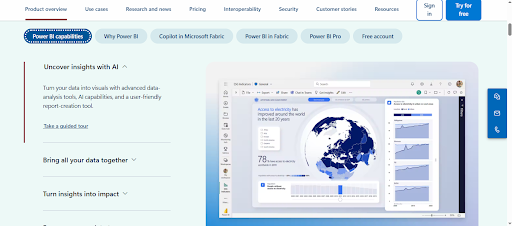
If your organization is already deeply embedded in the Microsoft ecosystem (Office 365, Azure, SQL Server), Power BI is often the default successor. However, it represents a shift in philosophy: unlike Crystal’s static "pages," Power BI is built for interactive "screens."
For users who specifically need the "printable document" functionality of Crystal Reports, Power BI offers a separate tool called Paginated Reports (via Report Builder), though this often requires Premium licensing.
Pros:
- Ecosystem Integration: Seamlessly connects with Excel and SQL Server.
- Visuals: Industry-leading interactive dashboards and drill-down capabilities.
- Paginated Reports: Can replicate the "pixel-perfect" printing capabilities of Crystal Reports.
Cons:
- Steep Learning Curve: Requires learning DAX (Data Analysis Expressions) for complex logic, which is a barrier for non-tech users compared to natural language tools.
- Complex Licensing: Costs can spiral quickly with "Premium" per-user licensing required for some paginated features.
3. SQL Server Reporting Services (SSRS)
Best for: 1:1 Replacement of Static, Paginated Reports For Technical Leads and .NET developers asking, "How do I print the exact same invoice I used to?", SSRS is the traditional answer.
It is less about "analytics" and more about "document generation." If your requirement is strictly to generate PDF bank statements, packing slips, or government forms that must look exactly the same every time, SSRS is the robust, legacy choice.
Pros:
- Free with SQL Server: If you have a standard SQL Server license, you likely already have SSRS.
- Printing Control: Excellent handling of pagination, headers, and footers for physical documents.
- Stable: A battle-tested solution for legacy .NET stacks.
Cons:
- Dated Interface: The developer experience and end-user viewer feel distinctively "legacy."
- Not for Self-Service: Business users cannot easily create their own reports; they rely on IT, perpetuating the reporting bottleneck.
- Maintenance Heavy: Requires managing your own report server.
4. DevExpress / Telerik Reporting
Best for: .NET Developers & Embedded Reporting
If you are a CTO or Product Manager building your own software application and you need to embed a reporting engine to replace the Crystal Reports Runtime, tools like DevExpress or Telerik are the industry favorites.
Unlike BlazeSQL (which is a standalone platform), these are component libraries for developers. They offer modern, lightweight .NET Core-compatible engines that allow you to design reports that look like Crystal but run on modern infrastructure.
Pros:
- Modern Tech Stack: Full support for .NET 6/7/8 and Blazor (unlike Crystal).
- Crystal Converter: Telerik includes a wizard to attempt automatic conversion of Crystal Report definitions.
- Embedded Focus: Designed to be a hidden part of your application, white-labeled for your customers.
Cons:
- Developer Required: This is strictly a tool for software engineers, not business analysts.
- Licensing: Per-developer licensing can get expensive for large teams.
5. Tableau
Best for: Advanced Visual Analytics
Tableau led the charge in moving the industry away from "boring tabular reports" toward "visual storytelling." If your team finds Crystal Reports too rigid or ugly, Tableau is the aesthetic opposite.
It is generally used by data analysts to perform deep exploratory work. While it can display tables, using Tableau to replicate a Crystal Report invoice is like using a Ferrari to deliver the mail—possible, but not what it was built for.
Pros:
- Best-in-Class Visuals: Stunning charts and graphs out of the box.
- Data Handling: Handles massive datasets gracefully.
- Intuitive: Drag-and-drop interface is easier for analysts than writing SQL.
Cons:
- Price: One of the most expensive options on the market.
- Weak Reporting: Very difficult to format for printing (e.g., multi-page PDF exports are notoriously frustrating).
Summary: Which Alternative is Right for You?
The "End of Life" for Crystal Reports’ legacy components is a wake-up call to stop patching old workflows and start modernizing them.
- Choose BlazeSQL if: You want to modernize. You want to empower your business team to get their own answers instantly via AI, eliminating the "report request" backlog forever.
- Choose Power BI if: You want dashboards. You are a Microsoft shop moving away from paper reports to interactive screens.
- Choose SSRS or DevExpress if: You want a clone. You specifically need to print pixel-perfect invoices or embed reporting into a custom .NET application.
Frequently Asked Questions (FAQ)
Is Crystal Reports being discontinued?
Yes and no. The 32-bit .NET Runtime is being discontinued in December 2025, which affects many legacy applications.11 Additionally, Crystal Reports for Enterprise will be removed from SAP Business Intelligence 2025.12 Standard Crystal Reports (2020/2025) 64-bit versions remain supported, but the ecosystem is shrinking.
What is the best free alternative to Crystal Reports?
If you already use Microsoft SQL Server, SSRS (SQL Server Reporting Services) is effectively free as it is included in the license.13 For open-source options, JasperReports is a popular choice, though it requires Java expertise.
Can BlazeSQL replace Crystal Reports?
BlazeSQL replaces the analytical use case of Crystal Reports. If you use Crystal to track sales, monitor KPIs, or analyze operations, BlazeSQL is a superior, faster alternative. If you use Crystal solely to print physical shipping labels or invoices, you may need a dedicated form-builder like SSRS alongside BlazeSQL.